
CUDA (Compute Unified Device Architecture) is NVIDIA’s parallel computing platform that allows scientists and engineers to use GPUs for general-purpose computing. GPUs were built to handle graphics, but CUDA helps them do other types of work too. With CUDA, thousands of cores in a GPU can be used for things like scientific simulations and data analysis. For problems that need lots of calculations happening at the same time, using GPUs with CUDA you can run your code 10 to 100 times faster than just using a regular CPU.
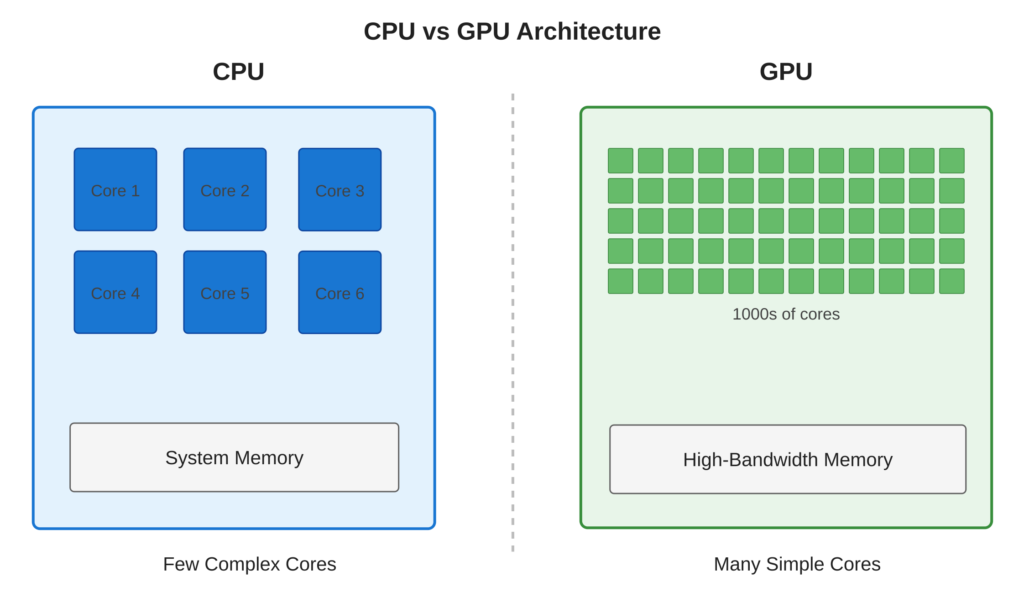
Refer to following diagram GPU vs CPU architecture comparison.
Core Concept
CPUs are good at doing tasks one after another. They have 4 to 32 strong cores that can handle complicated jobs. GPUs work differently. They have thousands of simple cores that can do many things at the same time. CUDA helps programmers use GPUs easily by letting them write code in C or C++.
Key Points
- Massive Parallelism: Modern GPUs contain thousands of CUDA cores (e.g., RTX 5090 has 21760 cores)
- SIMT Architecture: Single Instruction, Multiple Threads—ideal for data-parallel workloads
- Memory Bandwidth: GPUs provide 10-20x higher memory bandwidth than CPUs (up to 1 TB/s)
- Specialized Hardware: Tensor cores for AI, ray tracing cores for graphics
Code Example
Let’s see a Checking CUDA availability and printing basic device information
CUDA Implementation:
#include <stdio.h>
int main()
{
    int deviceCount = 0;
    cudaError_t error = cudaGetDeviceCount(&deviceCount);

    if (error != cudaSuccess) {
        printf("CUDA Error: %s\n", cudaGetErrorString(error));
        return 1;
    }

    printf("Found %d CUDA device(s)\n", deviceCount);

    for (int dev = 0; dev < deviceCount; dev++) {
        cudaDeviceProp prop;
        cudaGetDeviceProperties(&prop, dev);

        printf("\nDevice %d: %s\n", dev, prop.name);
        printf("  Compute Capability: %d.%d\n", prop.major, prop.minor);
        printf("  Total Global Memory: %.2f GB\n", prop.totalGlobalMem / 1e9);
    }
    return 0;
}
Code Highlights:
cudaGetDeviceCount()queries available GPUs in the systemcudaGetDeviceProperties()retrieves detailed GPU specifications- Compute Capability indicates GPU generation (e.g., 7.5 for Turing, 8.6 for Ampere)
Compilation Command:
nvcc cuda_devices.cuExample Output:
Found 1 CUDA device(s)

Device 0: NVIDIA GeForce RTX 5060 Ti
  Compute Capability: 12.0
  Total Global Memory: 16.60 GB
Usage & Best Practices
When to Use CUDA?
- Data-parallel problems: processing arrays, matrices, images
- Computationally intensive simulations: physics, molecular dynamics, CFD
- Machine learning: training neural networks, inference
- Signal/image processing: filtering, transformations, FFT
Best Practices :
- Start by identifying parallel portions of your code
- Use CUDA for computationally intensive tasks (not I/O bound operations)
- Consider existing libraries (cuBLAS, cuFFT) before writing custom kernels
Common Mistakes to Avoid :
- Avoid: Using GPU for small datasets (memory transfer overhead dominates)
Summary:
- CUDA enables general-purpose computing on NVIDIA GPUs with C/C++ extensions
- GPUs excel at data-parallel tasks with thousands of simultaneous threads
- Memory bandwidth and core count are key GPU advantages
- CUDA toolkit provides compilers, libraries, and debugging tools
- Check GPU availability and properties before developing applications
References:
