
Our first CUDA kernel helps connect CPU and GPU programming. It runs a simple function using many parallel threads. This is different from normal “Hello World” programs because it shows true parallelism, where hundreds or thousands of threads work at the same time.
To understand how this works, you need to know some basics:
- The
__global__qualifier tells CUDA that this function will run on the GPU. - You use launch syntax like
<<<>>>to start the kernel. - You can also use device-side
printf()to print messages from the GPU.
These basics are important for all GPU computing tasks.
Refer to following diagram for kernel execution flow visualization
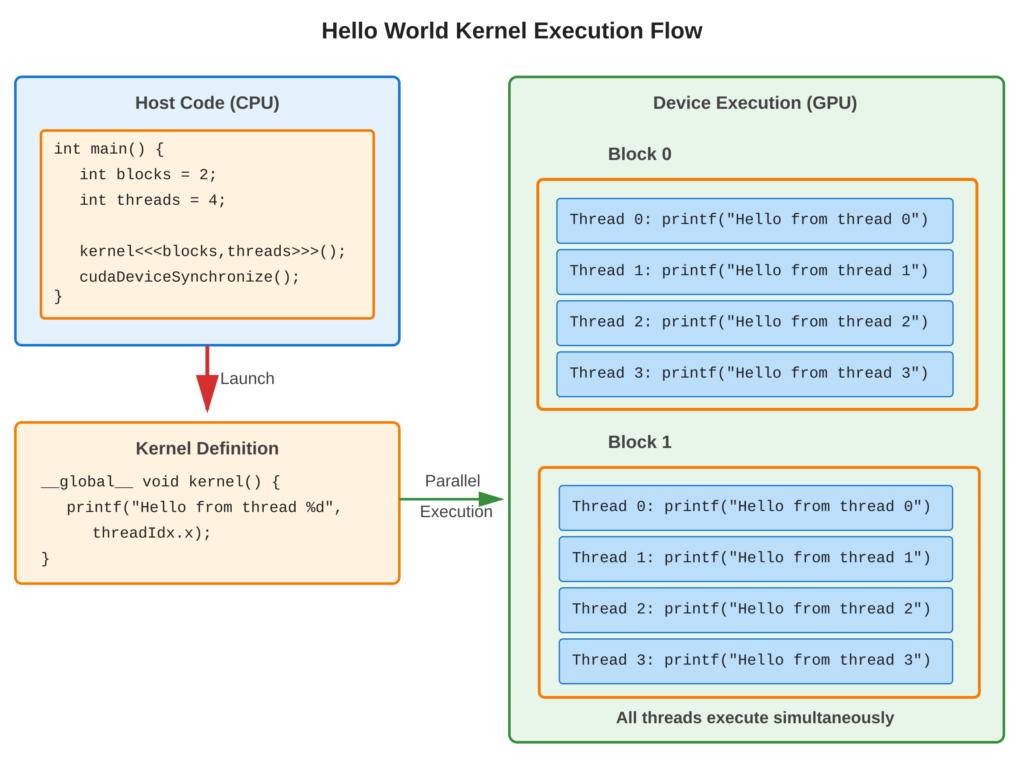
Core Concept
A CUDA kernel is a special C/C++ function marked with __global__ that runs on the GPU. When you start (“Launch”) this kernel from your main program, you use <<<numBlocks, threadsPerBlock>>> to tell it how many blocks and threads to use. Each thread in the kernel executes same code but can find out its own number using variables like threadIdx and blockIdx.
Key Points
__global__: This is a special keyword in CUDA that specifies a function as a kernel. A kernel can be called from the host but runs on the device.- Launch Syntax: To run a kernel, you use this format:
kernelName<<<grid, block>>>(args). This tells CUDA how many threads to create and where they should run. - Device printf: You can use
printf()inside your kernels for debugging purposes. - Thread Execution: All threads in a block run the same code at the same time, doing their work simultaneously.
- Synchronization: When you launch a kernel, the host program keeps running without waiting for the kernel to finish. If you need the host to wait until the kernel is done, you can use
cudaDeviceSynchronize().
Code Example
Basic kernel that prints from multiple threads to demonstrate parallelism –
CUDA Implementation:
#include <stdio.h>

// Kernel definition - runs on GPU
__global__ void helloKernel() {
    printf("Hello from thread %d in block %d\n",
           threadIdx.x, blockIdx.x);
}

int main() {
    // Launch configuration
    int numBlocks = 3;
    int threadsPerBlock = 4;

    printf("Launching kernel with %d blocks, %d threads each\n", numBlocks, threadsPerBlock);

    // Launch kernel
    helloKernel<<<numBlocks, threadsPerBlock>>>();

    // Wait for GPU to finish
    cudaDeviceSynchronize();

    printf("Kernel complete\n");
    return 0;
}
Example Output:
Launching kernel with 3 blocks, 4 threads each
Hello from thread 0 in block 0
Hello from thread 1 in block 0
Hello from thread 2 in block 0
Hello from thread 3 in block 0
Hello from thread 0 in block 1
Hello from thread 1 in block 1
Hello from thread 2 in block 1
Hello from thread 3 in block 1
Hello from thread 0 in block 2
Hello from thread 1 in block 2
Hello from thread 2 in block 2
Hello from thread 3 in block 2
Kernel completeNote: Output order may vary due to parallel execution
Usage & Best Practices
When to Use Kernels
- Data-parallel operations: same operation on array elements
- Independent computations: minimal/no thread interdependencies
- Compute-intensive tasks: mathematical operations, simulations
Best Practices
- Start with simple kernels to verify GPU functionality
- Use
cudaDeviceSynchronize()before checking results - Check errors after launch:
cudaGetLastError() - Avoid excessive printf in production kernels (performance impact)
Common Mistakes
- Avoid: Forgetting
__global__qualifier (compilation error) - Avoid: Not synchronizing before using results (incomplete data)
5. Key Takeaways
Summary:
__global__qualifier defines kernels that run on GPU- Triple angle brackets
<<<blocks, threads>>>launch kernels in parallel - Each thread executes kernel code independently
- Built-in variables (
threadIdx,blockIdx) identify individual threads printf()works in kernels for debugging- Always synchronize when immediate results are needed
Quick Reference
Kernel Definition:
__global__ void kernelName(params) {
    // Kernel code
}
Kernel Launch:
kernelName<<<numBlocks, threadsPerBlock>>>(args);
cudaDeviceSynchronize();  // Wait for completion
Compilation:
nvcc -o hello_kernel hello_kernel.cu
./hello_kernel
Thread Identification:
threadIdx.x: Thread index in block (0 to blockDim.x-1)blockIdx.x: Block index in grid (0 to gridDim.x-1)blockDim.x: Number of threads per blockgridDim.x: Number of blocks in grid
