
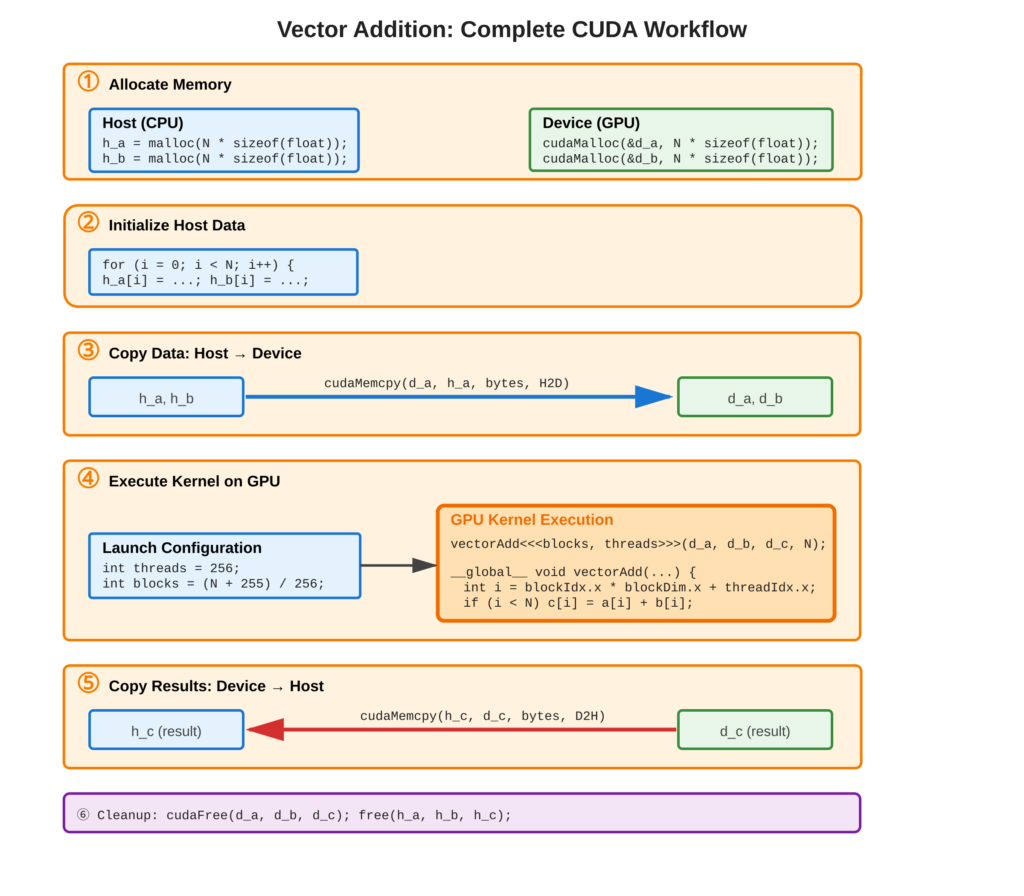
Vector addition (C[i] = A[i] + B[i]) is the our first parallel CUDA program, integrating memory management, data transfer, kernel execution, and error handling. This complete example demonstrates the full CUDA workflow: allocate device memory with cudaMalloc(), copy data with cudaMemcpy(), launch parallel kernel, retrieve results, verify correctness, and free allocated memories.
Refer to following diagram for complete workflow visualization
Core Concept
Vector addition works by adding elements one by one using different threads on the GPU. Each thread adds two numbers: C[i] = A[i] + B[i].
The process has five steps:
- Create memory for data in both host (computer) and device (GPU).
- Make input vectors on the computer.
- Send inputs to the GPU (
cudaMemcpyH2D). - Run a special program called a kernel on the GPU with set thread sizes.
- Get results back from the GPU (
cudaMemcpyD2H) and check if it is correct.
This pattern—create memory, transfer data, compute, get results—is used for all GPU-based algorithms.
Key Points
- Memory Allocation:
cudaMalloc()for device,malloc()/newfor host - Data Transfer:
cudaMemcpy()withcudaMemcpyHostToDevice/cudaMemcpyDeviceToHost - Kernel Launch:
kernel<<<blocks, threads>>>()with number of blocks and threads - Thread Mapping: Global index
i = blockIdx.x * blockDim.x + threadIdx.x - Cleanup:
cudaFree()andfree()to prevent memory leaks - Verification: Compare GPU result against CPU calculation
Code Example
Add two vectors of N elements in parallel
Complete CUDA Program:
#include <stdio.h>
#include <cuda_runtime.h>

#define N 1000000
#define CUDA_CHECK(call) { \
    cudaError_t err = call; \
    if (err != cudaSuccess) { \
        printf("CUDA error: %s\n", cudaGetErrorString(err)); \
        exit(1); \
    } \
}

__global__ void vectorAdd(float *a, float *b, float *c, int n) {
    int i = blockIdx.x * blockDim.x + threadIdx.x;
    if (i < n) {
        c[i] = a[i] + b[i];
    }
}

int main() {
    size_t bytes = N * sizeof(float);

    // Allocate host memory
    float *h_a = (float*)malloc(bytes);
    float *h_b = (float*)malloc(bytes);
    float *h_c = (float*)malloc(bytes);

    // Initialize input vectors
    for (int i = 0; i < N; i++) {
        h_a[i] = i * 1.0f;
        h_b[i] = i * 2.0f;
    }

    // Allocate device memory
    float *d_a, *d_b, *d_c;
    CUDA_CHECK(cudaMalloc(&d_a, bytes));
    CUDA_CHECK(cudaMalloc(&d_b, bytes));
    CUDA_CHECK(cudaMalloc(&d_c, bytes));

    // Copy to device
    CUDA_CHECK(cudaMemcpy(d_a, h_a, bytes, cudaMemcpyHostToDevice));
    CUDA_CHECK(cudaMemcpy(d_b, h_b, bytes, cudaMemcpyHostToDevice));

    // Launch kernel
    int threadsPerBlock = 256;
    int blocksPerGrid = (N + threadsPerBlock - 1) / threadsPerBlock;
    vectorAdd<<<blocksPerGrid, threadsPerBlock>>>(d_a, d_b, d_c, N);
    CUDA_CHECK(cudaGetLastError());
    CUDA_CHECK(cudaDeviceSynchronize());

    // Copy result back
    CUDA_CHECK(cudaMemcpy(h_c, d_c, bytes, cudaMemcpyDeviceToHost));

    // Verify
    for (int i = 0; i < N; i++) {
        if (fabs(h_c[i] - (h_a[i] + h_b[i])) > 1e-5) {
            printf("Error at %d\n", i);
            break;
        }
    }
    printf("Success!\n");

    // Cleanup
    cudaFree(d_a); cudaFree(d_b); cudaFree(d_c);
    free(h_a); free(h_b); free(h_c);
    return 0;
}
Usage & Best Practices
Performance Considerations
- Block Size: Multiples of warp size (32), typically 128/256/512 threads
- Grid Size: Ensure
blocks * threads >= Nfor complete coverage - Memory Transfer: Minimize
cudaMemcpy()calls - Asynchronous Operations: Use streams (will be covered later) for overlapping computation and transfer
Best Practices
- Always check bounds in kernel (
if (i < n)) - Verify results on small datasets first
- Use CUDA_CHECK macro for all API calls
- Profile (will be covered later) with Nsight Systems or Nsight Compute
Common Mistakes
- Forgetting
cudaDeviceSynchronize()before timing - Memory leaks from missing
cudaFree()/free()
Key Takeaways
Summary:
- Vector addition demonstrates complete CUDA workflow
- Five-step pattern: allocate, initialize, transfer, compute, retrieve
- Each thread processes one array element independently
- Grid/block sizing ensures all elements are processed
- Error checking and verification are essential
- Memory management requires matching alloc/free pairs
- This pattern scales to complex algorithms
Quick Reference
Complete Workflow:
// 1. Allocate
float *d_data;
cudaMalloc(&d_data, bytes);

// 2. Transfer to device
cudaMemcpy(d_data, h_data, bytes, cudaMemcpyHostToDevice);

// 3. Execute
kernel<<<blocks, threads>>>(d_data, n);

// 4. Transfer from device
cudaMemcpy(h_result, d_result, bytes, cudaMemcpyDeviceToHost);

// 5. Free
cudaFree(d_data);
Grid/Block Calculation:
int threads = 256;  // Power of 2, multiple of 32
int blocks = (N + threads - 1) / threads;  // Ceiling division
Memory Copy Directions:
| Direction | Flag |
|---|---|
| Host → Device | cudaMemcpyHostToDevice |
| Device → Host | cudaMemcpyDeviceToHost |
| Device → Device | cudaMemcpyDeviceToDevice |
| Host → Host | cudaMemcpyHostToHost |
Verification Pattern:
bool verify = true;
for (int i = 0; i < N; i++) {
    float expected = h_a[i] + h_b[i];
    if (fabs(h_c[i] - expected) > 1e-5) {
        printf("Mismatch at index %d\n", i);
        verify = false;
        break;
    }
}
Performance Metrics:
- Bandwidth: Compare actual vs. peak memory bandwidth
- Speedup: GPU time vs. CPU time
- Memory Efficiency: (Actual bandwidth / Peak bandwidth) × 100%
