
OpenMP is a tool that helps programmers write faster computer programs using multiple processors at the same time. It works with C, C++, and Fortran languages. With OpenMP, you don’t need to worry about managing threads yourself. The tool makes it easier to write parallel code, which means your program can use many cores of a computer’s processor without making things too complicated. By adding just a few lines of special instructions, you can turn normal programs into ones that run much faster on multi-core processors. This helps scientists and engineers get their work done quicker and more efficiently.
Refer to following diagram for OpenMP architecture overview.
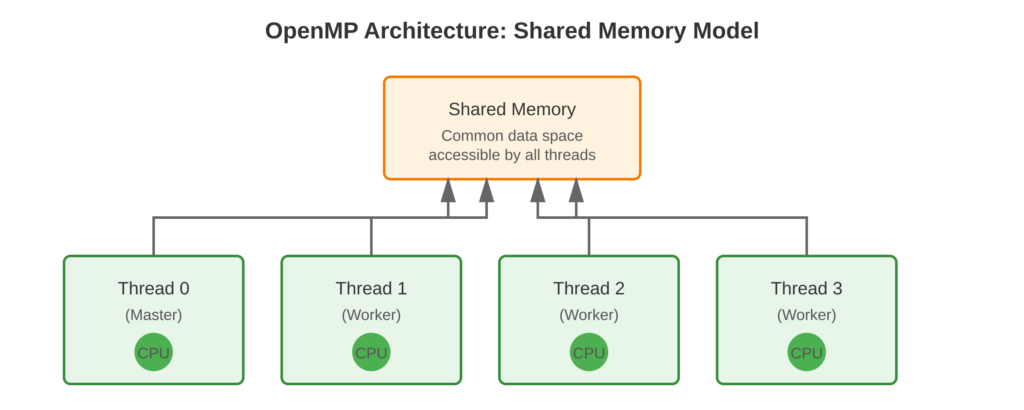
Core Concept
OpenMP uses special comments called #pragma statements to tell the compiler when and how to use multiple threads. The compiler reads these comments and changes your code to run on many threads at once. In OpenMP, all threads share the same memory space. This makes it easy for threads to share data with each other. It is simpler than using paradigms like MPI, where each process has its own separate memory space.
Key Points
- Compiler Directives: Use
#pragma ompto mark parallel regions - Shared Memory: All threads access common memory space
- Incremental Parallelization: Add parallelism gradually to existing code
- Portability: Code runs on any OpenMP-compliant compiler (GCC, Intel, Clang)
- Fork-Join Model: Master thread spawns worker threads when needed
Code Example
A simple program demonstrating OpenMP compilation and execution
OpenMP Implementation:
#include <stdio.h>
#include <omp.h>

int main() {
    printf("Before parallel region\n");

    #pragma omp parallel
    {
        int thread_id = omp_get_thread_num();
        printf("Hello from thread %d\n", thread_id);
    }

    printf("After parallel region\n");
    return 0;
}
Compilation:
gcc -fopenmp -o hello_openmp hello_openmp.c
./hello_openmp
Expected Output:
Before parallel region
Hello from thread 0
Hello from thread 1
Hello from thread 2
Hello from thread 3
After parallel region
The number of threads depends on how many CPU cores are available. Thread output order can be different each time, which is normal for tasks running at the same time.
Usage & Best Practices
When to Use
- Applications with computationally intensive loops
- Shared memory multicore systems (desktops, workstations, single-node HPC)
- Scientific simulations requiring rapid prototyping
Best Practices
- Start with sequential correctness before parallelizing
- Use OpenMP 3.0+ for modern features (most systems support this)
- Enable compiler optimization flags (
-O2or-O3) with-fopenmp - Test with different thread counts to find optimal performance
Common Mistakes
- Forgetting
-fopenmpflag results in serial execution - Ignoring race conditions in shared data
Key Takeaways
Summary:
- OpenMP simplifies shared memory parallel programming with compiler directives
- The
#pragma omp paralleldirective creates concurrent thread teams - Requires OpenMP-compliant compiler with
-fopenmpflag (GCC/Clang) or-qopenmp(Intel) - Ideal for multicore systems and incremental parallelization
Quick Reference
Compilation:
# GCC/Clang
gcc -fopenmp -O2 -o program source.c

# Intel Compiler
icc -qopenmp -O2 -o program source.c