
CUDA programs require special compilation to generate both CPU and GPU code. The nvcc tool helps by splitting the code into two parts: host (C++) and device (PTX/SASS). Then it combines them. Using the right compiler flags is important, especially the -arch flag, which tells the program which GPUs to run on. This makes your programs work well on specific GPUs Proper compilation options also enable debugging, profiling, and optimization critical for high-performance computing.
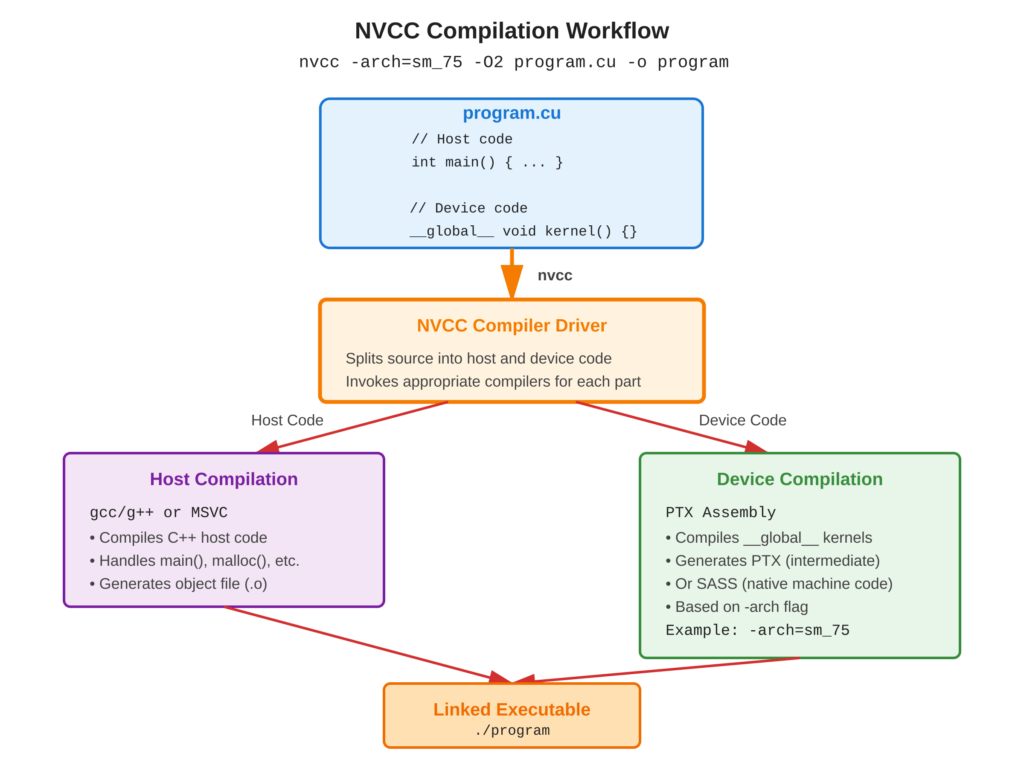
Refer to following diagram for nvcc compilation workflow
Core Concept
nvcc is a special compiler for NVIDIA CUDA that works on .cu files. These files have both CPU and GPU code.
When you use nvcc, it splits the code into two parts:
- The CPU part is compiled with gcc/g++ or MSVC.
- The GPU part is turned into PTX code or native SASS.
The -arch flag tells nvcc which type of GPU to target. This makes sure the code works on specific hardware.
Key Points
- nvcc: CUDA compiler driver coordinating host and device compilation
- Compute Capability: GPU generation (e.g., sm_50 for Maxwell, sm_86 for Ampere)
- PTX: Portable intermediate assembly for virtual GPU architecture
- SASS: Native GPU machine code for specific architecture
- Separate Compilation: Compile device code once, link multiple times
Code Example
Compiling a simple CUDA program with various flags
Basic Compilation:
# Simple compilation - default architecture
nvcc -o program program.cu

# Specify GPU architecture (compute capability 7.5 for Turing)
nvcc -arch=sm_75 -o program program.cu

# Enable optimizations
nvcc -O3 -arch=sm_75 -o program program.cu
Makefile Example:
# Reference: examples/Makefile
NVCC = nvcc
NVCC_FLAGS = -O2 -arch=sm_60
TARGET = myprogram

$(TARGET): main.cu
    $(NVCC) $(NVCC_FLAGS) -o $(TARGET) main.cu

clean:
    rm -f $(TARGET)
Flag Highlights:
-arch=sm_XX: Target specific compute capability (required for many features)-O2/-O3: Optimization levels (balance speed vs compile time)-g -G: Enable host and device debugging symbols--ptxas-options=-v: Verbose register/memory usage
Usage & Best Practices
When to Use Specific Flags
- Development:
-g -Gfor debugging with cuda-gdb - Production:
-O3 -use_fast_mathfor maximum performance - Distribution: Multiple
-gencodefor compatibility - Profiling:
-lineinfofor detailed profiling information
Best Practices
- Always specify
-archmatching your target GPU - Use
-O2or-O3for production builds - Check GPU compute capability:
nvidia-smi --query-gpu=compute_cap - Use Makefiles or CMake for complex projects
Common Mistakes
- Avoid: Using default architecture (may not support features you need)
- Avoid: Compiling without optimization flags in production
Key Takeaways
Summary:
nvcccompiles CUDA source mixing host and device code-arch=sm_XXtargets specific GPU compute capability-O2/-O3enables optimizations for better performance-g -Gadds debugging symbols for host and device- Fat binaries with multiple
-gencodesupport various GPUs
Quick Reference
Basic Commands:
# Minimal compilation
nvcc program.cu -o program

# With architecture and optimization
nvcc -arch=sm_75 -O2 program.cu -o program

# Run the program
./program
Common Compute Capabilities:
sm_50: Maxwell (GTX 9xx, Titan X)sm_60: Pascal (GTX 10xx, Tesla P100)sm_70: Volta (Tesla V100, Titan V)sm_75: Turing (RTX 20xx, GTX 16xx)sm_80: Ampere (A100)sm_86: Ampere (RTX 30xx)sm_89: Lovelace (RTX 40xx)
Essential Flags:
-arch=sm_XX          # Target architecture
-O2, -O3             # Optimization level
-g                   # Host debug info
-G                   # Device debug info
-lineinfo            # Line info for profiling
--ptxas-options=-v   # Verbose PTX assembly
-use_fast_math       # Fast math operations