
Robust CUDA programs require systematic error checking since GPU operations can fail silently. When you start a kernel on the GPU, it runs immediately without giving an error code if something goes wrong. Using cudaError_t, cudaGetLastError(), and error-checking macros helps catch problems like running out of memory, bad launch settings, or trying to access memory that isn’t there. Proper error handling turns confusing crashes into clear messages you can fix. This helps accelerating development and ensuring production reliability in your applications.
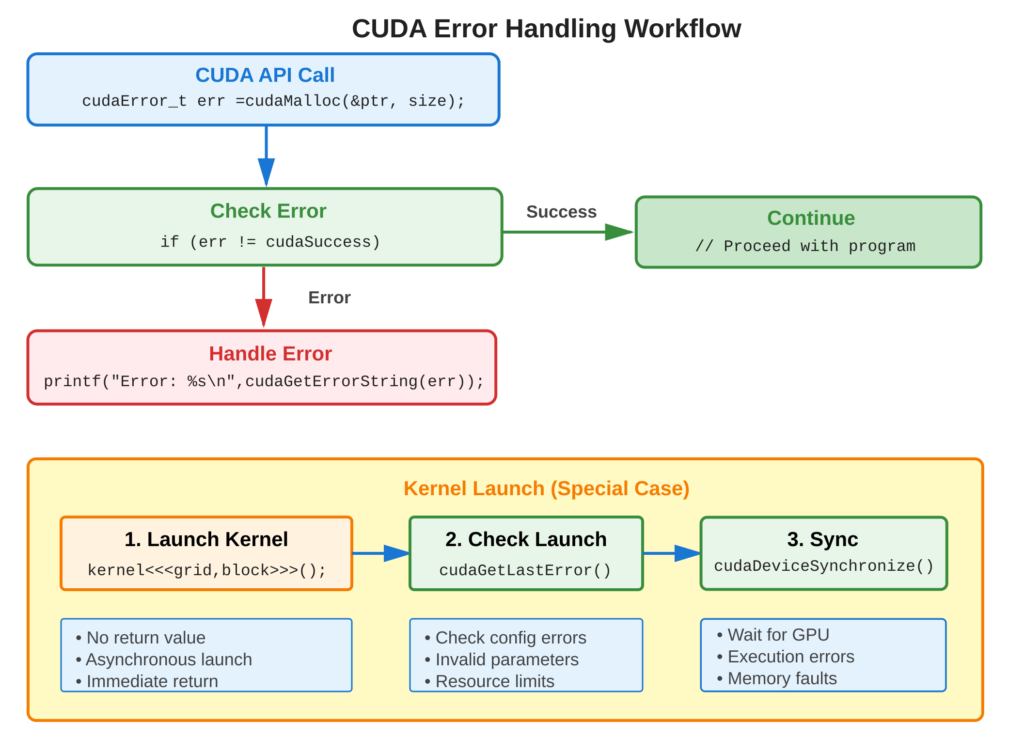
Refer to following diagram for error handling workflow
Core Concept
Main Idea
CUDA API functions return cudaError_t indicating success (cudaSuccess) or specific errors (e.g., cudaErrorMemoryAllocation). Kernel launches don’t return errors directly. You need to use cudaGetLastError() immediately after launch and cudaDeviceSynchronize() to catch execution errors. Building error-checking macros makes it easier to find problems when using the API. These macros wrap API calls and automatically report errors.
Key Points
- cudaError_t: Enumeration of all possible CUDA errors
- cudaSuccess: Value 0, indicates no error occurred
- cudaGetLastError(): Gets the last error and resets it.
- cudaPeekAtLastError(): Checks the last error without resetting it.
- cudaGetErrorString(): Converts error code to human-readable string
- Error Checking Macro: Wraps API calls so errors are reported automatically.
Code Example
Comprehensive error handling for CUDA operations
Error Checking Macro:
#define CUDA_CHECK(call) \
do { \
    cudaError_t err = call; \
    if (err != cudaSuccess) { \
        fprintf(stderr, "CUDA error at %s:%d: %s\n", __FILE__, __LINE__, cudaGetErrorString(err)); \
        exit(EXIT_FAILURE); \
    } \
} while(0)
Usage Example:
// Memory allocation with error checking
float *d_data;
CUDA_CHECK(cudaMalloc(&d_data, size));

// Memory copy with error checking
CUDA_CHECK(cudaMemcpy(d_data, h_data, size, cudaMemcpyHostToDevice));

// Kernel launch - check separately
myKernel<<<grid, block>>>(d_data);
CUDA_CHECK(cudaGetLastError());  // Check launch errors
CUDA_CHECK(cudaDeviceSynchronize());  // Check execution errors

// Cleanup with error checking
CUDA_CHECK(cudaFree(d_data));
Manual Error Checking:
cudaError_t err = cudaMalloc(&d_data, size);
if (err != cudaSuccess) {
    printf("cudaMalloc failed: %s\n", cudaGetErrorString(err));
    return 1;
}
Usage & Best Practices
When to Check Errors
- Always: Memory allocation/deallocation (cudaMalloc, cudaFree)
- Always: Memory transfers (cudaMemcpy)
- Always: After kernel launches (cudaGetLastError)
- Always: Before reading results (cudaDeviceSynchronize)
- Development: Use cuda-memcheck for memory errors
Best Practices
- Define error-checking macro in header file
- Use macro for all CUDA API calls
- Check both kernel launch and execution errors
- Log errors with file/line information
- Use cuda-gdb for kernel debugging
Common Mistakes
- Avoid: Ignoring kernel launch errors (silent failures)
- Avoid: Not synchronizing before checking execution results
Key Takeaways
Summary:
- All CUDA API functions return
cudaError_tstatus codes - Kernel launches require
cudaGetLastError()for error checking cudaDeviceSynchronize()catches kernel execution errors- Error-checking macros simplify error handling
cudaGetErrorString()provides human-readable error messages- Systematic error checking prevents silent failures
Quick Reference
Error Checking Macro:
#define CUDA_CHECK(call) \
do { \
    cudaError_t err = call; \
    if (err != cudaSuccess) { \
        fprintf(stderr, "Error %s:%d: %s\n", __FILE__, __LINE__, cudaGetErrorString(err)); \
        exit(EXIT_FAILURE); \
    } \
} while(0)
Kernel Error Checking:
kernel<<<grid, block>>>(args);
cudaError_t err = cudaGetLastError();
if (err != cudaSuccess) {
    // Handle launch error
}
err = cudaDeviceSynchronize();
if (err != cudaSuccess) {
    // Handle execution error
}
Common Error Codes:
cudaSuccess: Operation successfulcudaErrorMemoryAllocation: Out of memorycudaErrorInvalidValue: Invalid argumentcudaErrorInvalidConfiguration: Invalid kernel launch configcudaErrorLaunchFailure: Kernel launch failedcudaErrorIllegalAddress: Invalid memory access
Debugging Tools:
# Memory error checker
cuda-memcheck ./program

# Debugger
cuda-gdb ./program