The CUDA programming model splits work between two parts: the CPU (host) and the GPU (device). The CPU controls what happens in the program and sends tasks called kernels to the GPU for processing. To write good CUDA programs, you need to understand how these two parts work together and how tasks are organized into groups called grids and blocks. This model helps match the parallel tasks of your problem with the hardware design of the GPU.
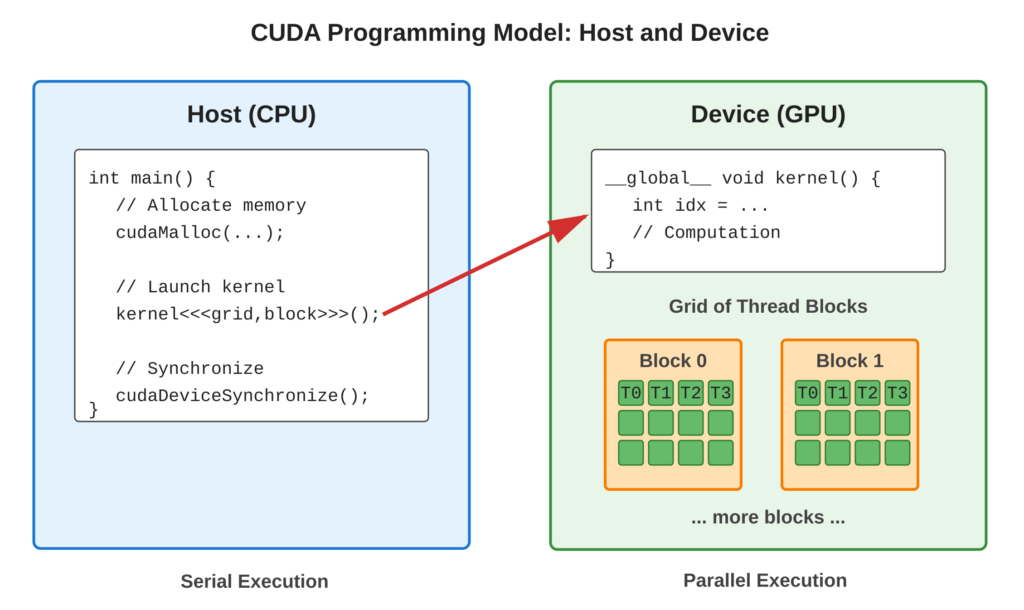
Following diagram provide visual representation of for host-device execution model.
Core Concept
CUDA programs run in two places: the host and the device.
- Host: This is your computer’s CPU. It uses traditional sequential logic to do tasks one after another.
- Device: This is the GPU. It runs many things at once, which is called massively parallel.
The host does three main jobs:
- It sets aside (allocates) memory.
- It moves data around.
- It starts (launches) kernels on the device.
Each time you start a kernel, it creates a grid of thread blocks. Each block has many threads. These threads run the same code but work with different data. This is called SIMT (Single Instruction, Multiple Threads).
Key Points:
- Host (CPU): Controls program flow, manages memory, launches kernels
- Device (GPU): Executes parallel kernels with thousands of threads
- Kernel: Function marked with
__global__that runs on device, callable from host - Thread Hierarchy: Grid → Blocks → Threads (3-level organization)
- SIMT Execution: Single Instruction, Multiple Thread—all threads execute same code path
Code Example
Let’s look at a very simple kernel demonstrating host-device separation and thread hierarchy.
#include <stdio.h>

// Device code: kernel function
__global__ void helloFromGPU() {
    int blockId = blockIdx.x;
    int threadId = threadIdx.x;

    printf("Hello from block %d, thread %d\n", blockId, threadId);
}

// Host code: main function
int main() {
    printf("Host: Launching kernel...\n");

    // Kernel launch configuration
    int numBlocks = 2;
    int threadsPerBlock = 4;

    // Launch kernel: <<<numBlocks, threadsPerBlock>>>
    helloFromGPU<<<numBlocks, threadsPerBlock>>>();

    // Wait for GPU to finish
    cudaDeviceSynchronize();

    printf("Host: Kernel execution complete\n");

    return 0;
}
Code Highlights:
__global__qualifier marks function as kernel (callable from host, runs on device)- Built-in variables
blockIdxandthreadIdxidentify each thread uniquely - Triple angle brackets
<<<...>>>launch kernel with specified configuration cudaDeviceSynchronize()blocks host until all GPU threads complete
Example Output:
Host: Launching kernel...
Hello from block 0, thread 0
Hello from block 0, thread 1
Hello from block 0, thread 2
Hello from block 0, thread 3
Hello from block 1, thread 0
Hello from block 1, thread 1
Hello from block 1, thread 2
Hello from block 1, thread 3
Host: Kernel execution complete
Usage & Best Practices
When to Use This Model :
- Data-parallel problems: apply same operation to many elements
- Independent computations: minimal dependencies between threads
- Regular memory access patterns: arrays, matrices, grids
Best Practices :
- Choose block size as multiple of 32 (warp size) for efficiency
- Typical block sizes: 128, 256, or 512 threads
- Calculate grid size to cover entire dataset:
gridSize = (N + blockSize - 1) / blockSize
Common Mistakes to avoid:
- Avoid: Launching kernels without checking for errors
- Avoid: Forgetting
cudaDeviceSynchronize()when kernel output is needed immediately
Summary
- Host (CPU) and device (GPU) execute different code sections
- Kernels (
__global__functions) run massively parallel on GPU - Threads organized hierarchically: Grid → Blocks → Threads
- Launch kernels with
<<<numBlocks, threadsPerBlock>>>syntax - Built-in variables identify threads:
blockIdx,threadIdx,blockDim,gridDim
Next Steps: Tutorial 03 – Writing your first complete CUDA kernel with computation
Complete Code: See examples/ folder for working implementation
Quick Reference
Kernel Qualifiers:
__global__: Runs on device, called from host__device__: Runs on device, called from device__host__: Runs on host (default for regular functions)
Compilation and execution:
nvcc -o programming_model programming_model.cu
./programming_model
Built-in Variables:
gridDim: Dimensions of grid (in blocks)blockDim: Dimensions of block (in threads)blockIdx: Block index within gridthreadIdx: Thread index within block
